# References

Referencing your data is essential for ensuring traceability, credibility, and easier validation of information. By assigning your materials or entries to relevant sources, you help maintain data integrity and improve overall system transparency. Reference your data by providing a name, selecting a [Reference type](/total-materia-integrator/creator/data-maintenance/reference-types.md) (e.g., literature, supplier data, standard), and optionally adding a website or document link.

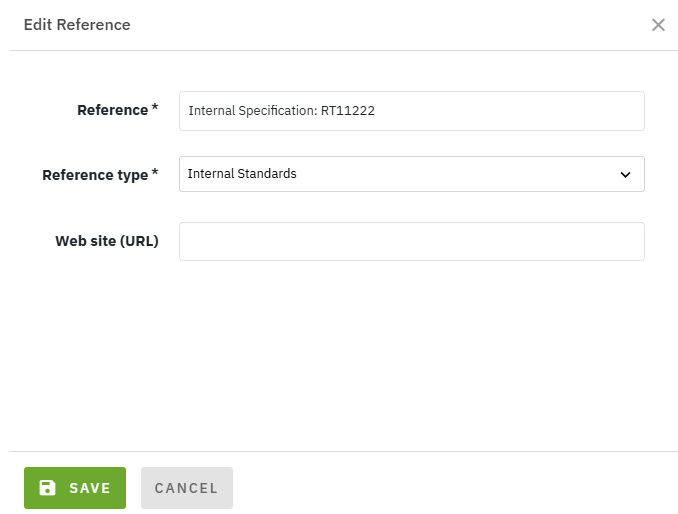
To create a new Reference or edit/delete an existing one, click the "ADD REFERENCE"<img src="/files/ibqvGoWarZFaXSArMyvM" alt="" data-size="line"> or <img src="/files/gZVQvKOaachot6qs8lPO" alt="" data-size="line"> buttons in the interface. This action opens a window for entering the mandatory "Reference" name and selecting "[Reference type](/total-materia-integrator/creator/data-maintenance/reference-types.md)", with optional fields for a website or document link.

<figure><img src="/files/jbdD6aOejpoKKqwyDxH6" alt=""><figcaption><p><strong>Figure 1:</strong> Screenshot of Edit Reference in Data Maintenance section</p></figcaption></figure>


---

# Agent Instructions: Querying This Documentation

If you need additional information that is not directly available in this page, you can query the documentation dynamically by asking a question.

Perform an HTTP GET request on the current page URL with the `ask` query parameter:

```
GET https://docs.totalmateria.com/total-materia-integrator/creator/data-maintenance/references.md?ask=<question>
```

The question should be specific, self-contained, and written in natural language.
The response will contain a direct answer to the question and relevant excerpts and sources from the documentation.

Use this mechanism when the answer is not explicitly present in the current page, you need clarification or additional context, or you want to retrieve related documentation sections.
