
Figure 1: Screenshot of 2024 (AA) Total Materia Horizon material and Copy to Total Materia Integrator feature
 button located in the upper right corner of [Material Pages](https://docs.totalmateria.com/total-materia-integrator/total-viewer/material-pages) (both in [Total Viewer](https://docs.totalmateria.com/total-materia-integrator/total-viewer) and [Creator](https://docs.totalmateria.com/total-materia-integrator/creator)). Clicking this button will open a pop-up window where the users can select the desired property group to be copied. "Next Step"
  button will allow users to select desired conditions to be copied (narrowing the list of desired condition for copy is possible by filtering conditions by [Property Group](https://docs.totalmateria.com/total-materia-integrator/creator/data-maintenance/property-groups), [Parameters](https://docs.totalmateria.com/total-materia-integrator/creator/data-maintenance/parameters) and [Reference](https://docs.totalmateria.com/total-materia-integrator/creator/data-maintenance/references)). Selecting the desired condition(s) and clicking the "Next Step" button will take users to the page where they can select the material(s) to copy the data to.
After selecting the desired material(s) to which the data will be copied, clicking the "Copy"
button will allow users to select desired conditions to be copied (narrowing the list of desired condition for copy is possible by filtering conditions by [Property Group](https://docs.totalmateria.com/total-materia-integrator/creator/data-maintenance/property-groups), [Parameters](https://docs.totalmateria.com/total-materia-integrator/creator/data-maintenance/parameters) and [Reference](https://docs.totalmateria.com/total-materia-integrator/creator/data-maintenance/references)). Selecting the desired condition(s) and clicking the "Next Step" button will take users to the page where they can select the material(s) to copy the data to.
After selecting the desired material(s) to which the data will be copied, clicking the "Copy"  button will enable the copy of selected data sets and allow users to view the copied data directly by clicking the link to the material(s).
Figure 1: Screenshot of 2024 (AA) Total Materia Horizon material and Copy to Total Materia Integrator feature

Figure 2: Screenshot of Copy to Total Materia Integrator for material 2024 (AA) and its selected condition for copying
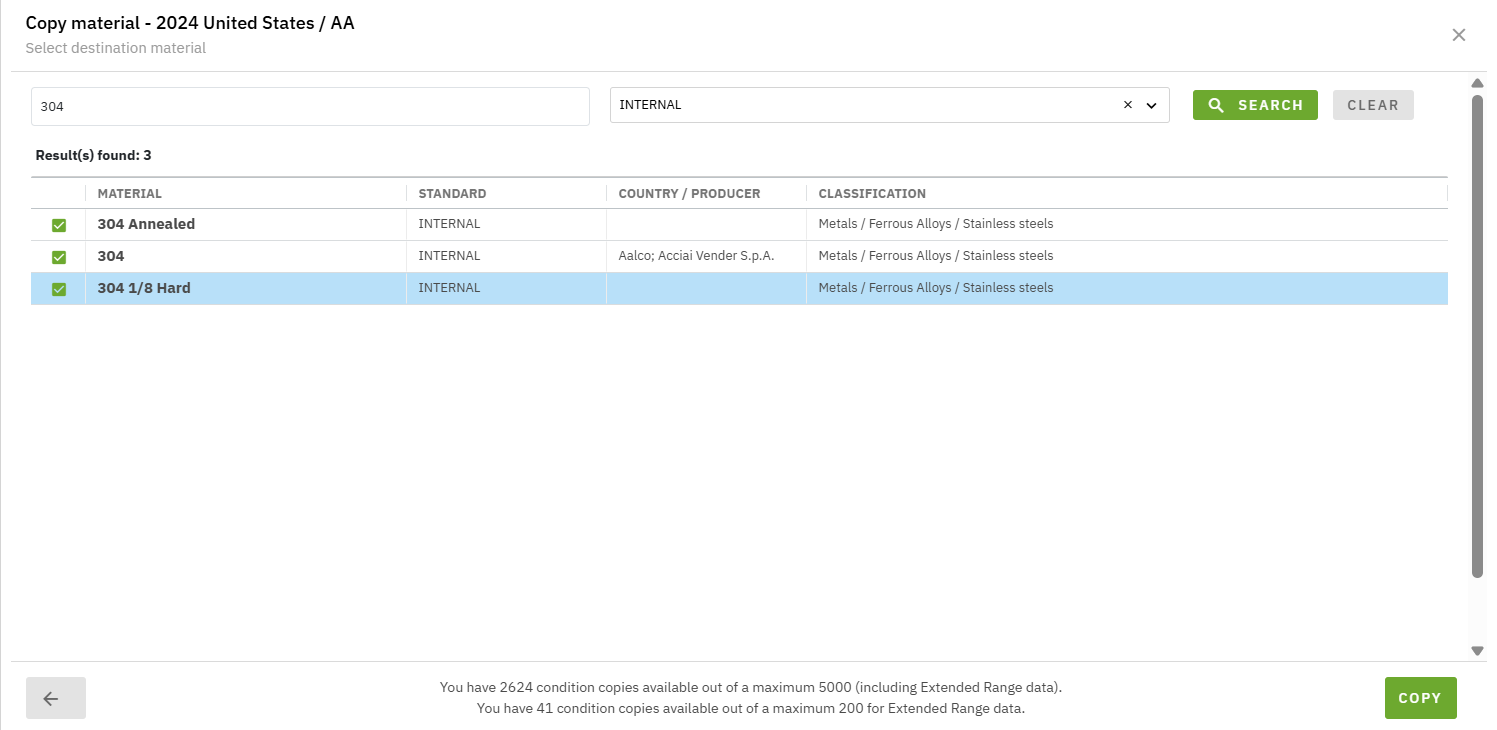
Figure 3: Screenshot of Copy to Total Materia Integrator and materials to which data will be copied

Figure 4: Screenshot of Copy to Total Materia Integrator and materials to which data is copied