# Special Products

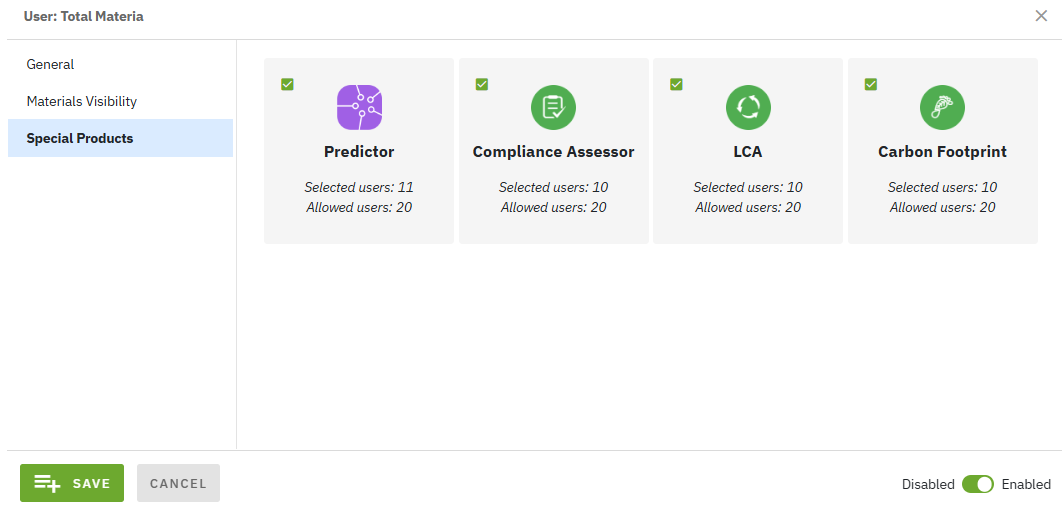
Adding each of Total Materia special products: [Predictor](https://docs.totalmateria.com/predictor/), [Compliance Assessor](/green-line/compliance-assessor.md),  [LCA](/green-line/life-cycle-assessment.md) and [Carbon Footprint](/green-line/carbon-footprint.md) is optional and it can be enabled by an Administrator for each user, by checking each product indivially in the [Users](/total-materia-integrator/creator/user-management/users.md) section and its 'Special Products' subsection.

Integrating various Total Materia products will enhance your data system and provide additional value:

* [**Predictor**](https://docs.totalmateria.com/predictor/) for accurate [Total Materia Horizon](https://docs.totalmateria.com/) material property modeling and prediction.
* [**Compliance Assessor**](/green-line/compliance-assessor.md) for instant complaince evaluation of up to 1,000 [Total Materia Horizon](https://docs.totalmateria.com/) materials.
* [**LCA**](/green-line/life-cycle-assessment.md) to benchmark environmental impacts with over 40 indicators.
* [**Carbon Footprint**](/green-line/carbon-footprint.md) for assessing CO2 emissions based on production, processing, and supply chain parameters.

To add special products, navigate to the [Users](/total-materia-integrator/creator/user-management/users.md) subsection within the [User Management](/total-materia-integrator/creator/user-management.md) section. Click the <img src="/files/ZJX5uGDuJRpWxBpAH2xr" alt="" data-size="line"> button for adding new user or <img src="/files/SQQvx6nAeVxCn269DTMZ" alt="" data-size="line"> button for existing user. Click the "Special Products" section and check desired products. This enables the selected user to access all added modules.

<figure><img src="/files/HCOslcgHYCr2X2pX5AL1" alt=""><figcaption><p><strong>Figure 1:</strong> Screenshot of Special Products page with selected Total Materia special products</p></figcaption></figure>

{% hint style="warning" %}
The availability of special products depends on your company’s subscription.
{% endhint %}


---

# Agent Instructions: Querying This Documentation

If you need additional information that is not directly available in this page, you can query the documentation dynamically by asking a question.

Perform an HTTP GET request on the current page URL with the `ask` query parameter:

```
GET https://docs.totalmateria.com/total-materia-integrator/creator/user-management/special-products.md?ask=<question>
```

The question should be specific, self-contained, and written in natural language.
The response will contain a direct answer to the question and relevant excerpts and sources from the documentation.

Use this mechanism when the answer is not explicitly present in the current page, you need clarification or additional context, or you want to retrieve related documentation sections.
