> For the complete documentation index, see [llms.txt](https://docs.totalmateria.com/llms.txt). Markdown versions of documentation pages are available by appending `.md` to page URLs; this page is available as [Markdown](https://docs.totalmateria.com/green-line/compliance-assessor-new/exemptions.md).
# Exemptions
In Compliance Assessor, exemptions are available for **RoHS**, **ELV**, and **REACH Annex XVII** requirements.
Exemptions are legal provisions that allow restricted substances or materials in defined applications. They apply where technical limitations, unavailable alternatives, or other defined conditions prevent full compliance.
Applying an exemption in Compliance Assessor marks the relevant material as exempt where applicable. This ensures reporting reflects the exemption and the material’s regulatory status accurately..
### **Apply exemptions**
Users can apply exemptions in two ways.
Select the **Exemption** button next to a material’s non-compliant or unassessed status icon, a wizard will guide you through the selection of the appropriate exemption (see [RoHS/ELV](#elvs-and-rohs) or [REACH Annex XVII](#reach-ec-no-1907-2006-annex-xvii) below for details)
### **ELVs and RoHS**
**ELVs** and **RoHS** regulations include specific exemptions for cases where alternatives are not yet technically feasible. These exemptions help balance environmental goals with the practical considerations of technological limitations, safety requirements, and economic impacts.
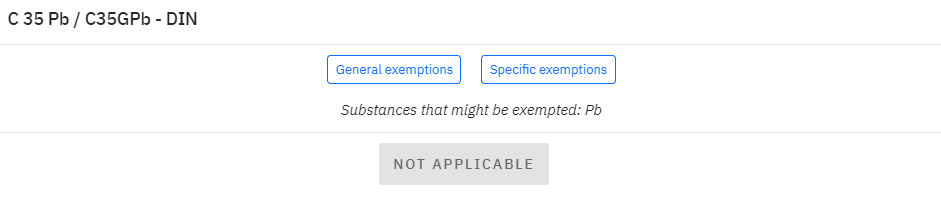
In the **Compliance Assessor**, exemptions can be applied to materials that are otherwise non-compliant with ELVs or RoHS regulations, particularly when they serve a special use. Users can access a list of general and specific exemptions by selecting the **"exemption"** button next to a material's non-compliant or unassessed status.
Exemption window shows the substance that might be exempted and gives the option to specify the exemption whether the material is for general or specific use.
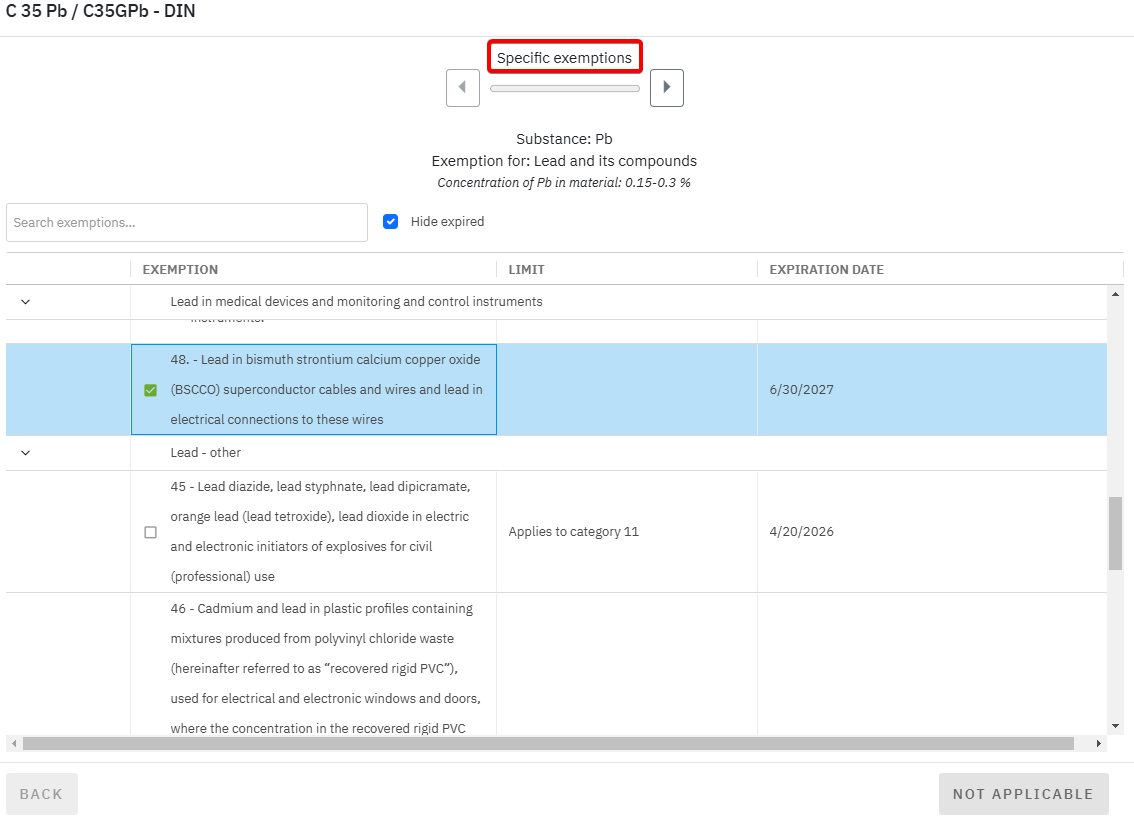
**General exemptions** apply broadly across various products with specific functions (e.g. military equipment); and **specific exemptions** target specific components or applications with their expiration dates (e.g. lead in glass -> 5(a) - Lead in glass of cathode ray tubes).
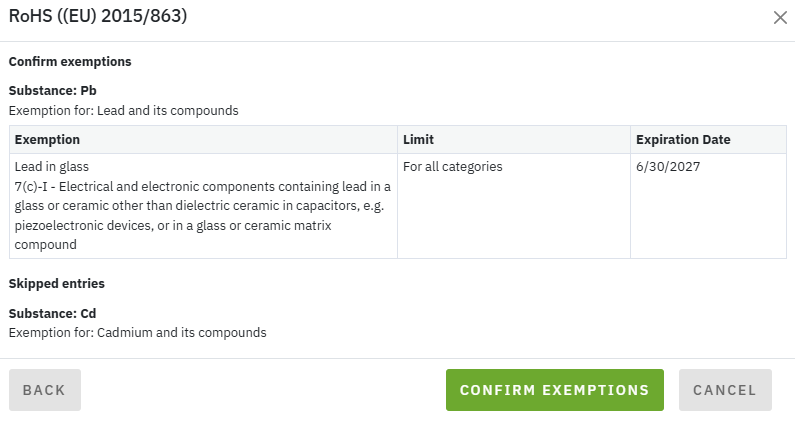
Once a suitable exemption is chosen, click the right arrow to review it.
After verifying, click the **"apply"** to add the exemption, along with its corresponding icon, to the material's compliance status in the **Compliance Assessor** list. This process ensures that materials with special uses can be accounted for under the appropriate regulatory framework.
Note that unknown chemical identities within a material’s composition prevent the selection of specific exemptions for the relevant substances. By enabling the ‘Exclude undefined chemical criteria’ option, the assessment can proceed without these unspecified components, allowing appropriate exemptions to be applied in accordance with the identified elements.
### REACH (EC) No 1907/2006, Annex XVII
The **REACH Annex XVII Regulation** includes **Conditions of Restriction** that, instead of imposing a complete ban on listed substances in every case, limit their manufacture, placing on the market, or use as targeted risk management measures to ensure identified risks are adequately controlled. This approach also considers the availability of suitable alternatives and the socio-economic impacts of the restriction, allowing essential uses to continue where appropriate.
In the **Compliance Assessor**, Conditions of restriction in the form of "exemptions" can be applied to materials that are otherwise non-compliant with **REACH Annex XVII** regulation, particularly when they don't serve a special use. Users can access a list of exemptions by selecting the **"exemption"** button next to a material's non-compliant status.
Exemption window shows the Entries that are applicable to the corresponding material and gives the option to specify the exemption whether the material is intended for the specific use.
By proceeding to the next step, each applicable **Condition of Restriction** and its full description will be displayed, enabling the user to determine whether the conditions apply to their use of the substance or material. After carefully reviewing each condition, the user can select a checkbox to confirm that they have read the information and that their application does not fall within the specified restriction conditions.
After all exemptions have been reviewed and selected, the final step is to review the chosen options and apply the exemptions by clicking the “Apply exemptions” button.
The status of the exempted material will be updated in accordance with the applicable Entry descriptions and displayed in the tooltip of the updated exempted icon.
Note that unknown chemical identities within a material’s composition prevent the overall "Exempted" status for the relevant material.
By enabling the ‘Exclude undefined chemical criteria’ option, the assessment can proceed without these unspecified components, allowing appropriate exemption status to be applied in accordance with the identified elements on the material level.
{% hint style="info" %}
Users can selectively choose which exemptions should be added. If an exemption is 'not applicable', it can be **skipped** without affecting the remaining exemptions.
**Note** that all exemptions applicable to a certain substance must be selected and applied. If at least one applicable exemption is skipped, the substance will remain '**Not Compliant'**.
{% endhint %}
### Bulk Exemption
Select multiple materials in the Overview and use **Bulk Exemption** to choose and apply exemptions to multiple materials at once. This allows you to manage exemptions for multiple materials in a single process instead of applying them individually. This option is also available in the **Details** view, where exemptions are applied to all materials and selection of certain materials is not available in this view.
When the bulk exemption process is initiated, a wizard will open and prompt the user to select the **regulation** for which the exemptions will be added. The available steps and exemption options depend on the regulation selected.
The mechanics for applying exemptions are the same as described above for each type of regulations.
Exemptions can be **applied** or **skipped**, and before finalizing, a review step allows you to verify which exemptions will be applied and which will be skipped.
After reviewing the applicable exemptions, the user can proceed with the selected exemptions. The chosen exemptions are then applied to the relevant materials in bulk, reducing the amount of manual work required.